

"This should have been a text" - Regaining Time by Summarizing YouTube Videos Using ChatGPT

Image generated by OpenAI's DALL-E-2 from the title of this article (in the style of Picasso)
In this article, you'll discover how to use Large Language Models like ChatGPT to extract quick summaries from YouTube videos, turning lengthy view times into concise reading experiences.
I'll admit that I'm a bit of a grumpy old man, and one of the things that makes me even grumpier than usual is the trend of turning EVERYTHING into a 15 minute video. Simple 3 step "how-tos" and product reviews are expanding to fill all of our available time.
Here I'll outline a simple process that can streamline extracting the information you want while saving time.
First you need access to a Large Language Model - ChatGPT, Bing (augmented with ChatGPT), Bard (from Google), etc. I have a window open on ChatGPT all the time as I have been using it for a lot of productivity enhancing activities of late. You can head over to openai.com and set up a free account if you want to try it out.
Now, most (but not all) YouTube videos have "transcripts." These are often used to provide closed-captioning. Underneath the video, just under the right hand corner, you should see three dots (...). If that isn't there, then there's no transcript and this method won't work. If you click on the three dots, one of the options is "Show Transcript." Click on that and to the right of the video the transcript should appear...

Note the three horizontal dots in the red circle
The transcript will have time stamps, which we don't want. But getting rid of them is simple.
To the upper right of the transcript you'll see three vertical dots. Click here and then click on "Toggle Timestamps." The timestamps should just disappear. Now just copy all the text of the transcript to your clipboard. (Note that you may have to scroll down within the transcript window to get all of the transcript).
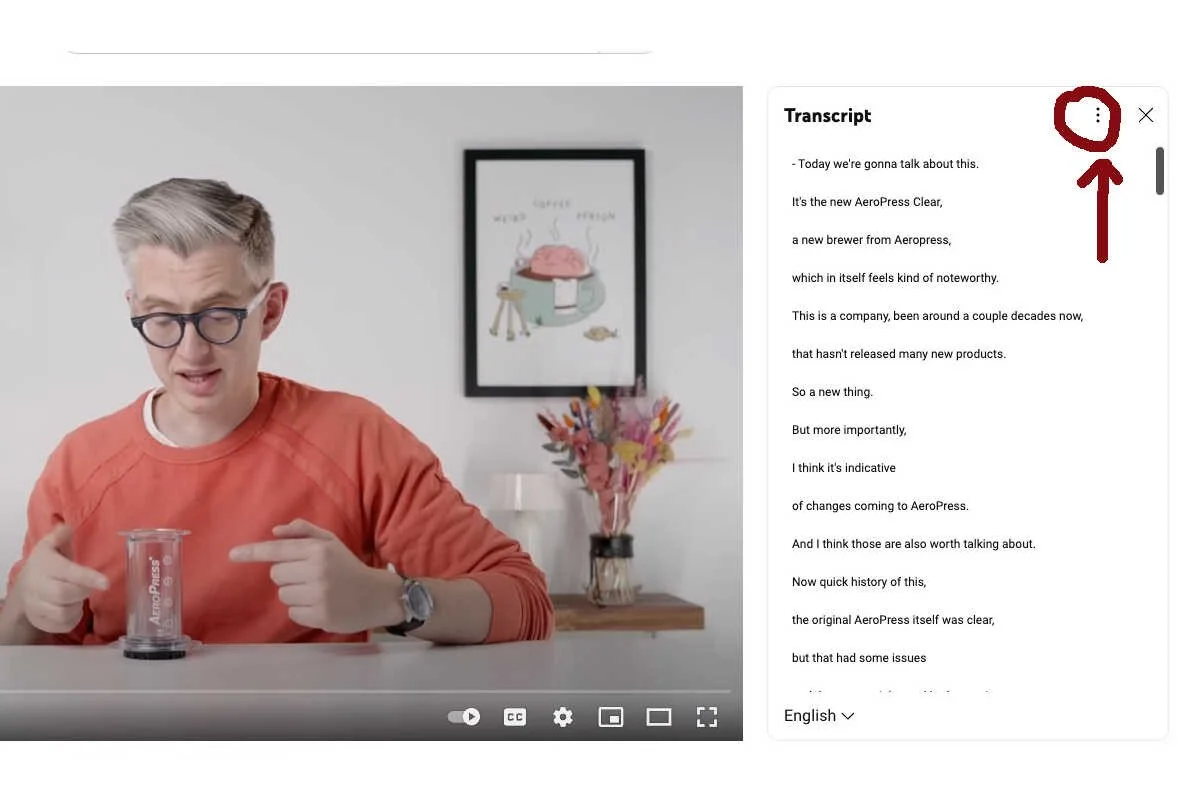
Note the three vertical dots in the red circle
Now, head over to your ChatGPT browser tab and follow these steps:
In the text box, type: "Please summarize the following transcript for me, I'd like the output in bullet points."
Insert three double quotes (""").
Paste the transcript.
Insert three more double quotes (""").
Hit enter or click send.
With these steps, you'll receive a succinct summary.
Why the quotes? This is a message to ChatGPT that helps it separate your instructions from the text to be summarized.
That's it... you should get a nice summary.
If you want you can follow up with further questions. For example, if we are looking at a product review, rather than a summary we could simply ask: "What is the reviewer's opinion of this product? Also, please list the reviewers pros and cons." We'll now receive a concise distillation of the review.
Start to finish, maybe a minute. This includes reading the summary.
Let's look at an example.
Here's the video - a review of the new, improved Aeropress coffee maker by Coffee Guru James Hoffman.
The YouTube video is here: https://www.youtube.com/watch?v=NWvU-MncnJI
I pasted the review transcript into ChatGPT (using the most current GPT-4 model) and asked "What was the presenter's overall opinion of the product?" and I got this response:
The presenter had mixed feelings about the AeroPress Clear.
They appreciated the return to the clear design that many users missed, as well as the use of the Tritan material to solve previous material issues.
However, they pointed out several drawbacks. They noted a minor manufacturing defect that left two small marks on the brewer, and they voiced concerns about the future stain resistance of the clear material.
The presenter was not happy with the price increase, especially as the AeroPress Clear doesn't feel more premium than the original. They noted the brewer's original appeal was its affordability, portability, and good performance.
The presenter also expressed concern about the company's direction since it's now offering fewer paper filters and creating new, more expensive products. They worried that the company is moving away from the accessible, flexible brewer it once was.
While the presenter remained hopeful for the AeroPress' future products, they remained critical, questioning the choices of materials for upcoming products and their potentially high price points.
Overall, they seem to perceive a disconnect between the current product direction and the community that fell in love with AeroPress for its accessibility and brewing flexibility.
I did watch this video in full (I'm a James Hoffman fan, what can I say?) and this summary really nails the most important points he made in the video. If all you cared about was that, you'd be done in under one minute vs. the 14 minute video run-time.
This approach can be used to answer many other questions, such as 'What were the main points the presenter made?' or 'What issues did the presenter have with the product?' The possibilities are endless, depending on what you want to extract from the video.
If you want to save even more time, you can ask ChatGPT to just condense the review into a "star rating" with a prompt like "Please estimate what star rating (1 to 5) the reviewer would give this product and just give the number." In our example, ChatGPT responded with "Based on the critique and concerns outlined by the reviewer, I'd estimate a rating of 3 stars." This seems like a pretty fair representation of the review.
Time is valuable (just ask any grumpy old man!) and these tools are here to help you make the most of it. Start using Large Language Models like ChatGPT to streamline your information gathering process and let us know how it's transforming your productivity!
Thomas Niccum